
Testing
Docs for PKI Manager 3.17.0 (released 2026-11-24), from main 4d59c30 (30 commits after the release). Page changed after 3.17.0, not in a release yet.
Source:
docs/development/testing.md
How to test PKI Manager: unit tests, type checks, end-to-end tests in Docker, and the examples of the documentation.
Unit tests and checks
Section titled “Unit tests and checks”Backend and frontend use Vitest and TypeScript.
just test # unit tests of backend and frontendjust typecheck # type-check bothjust lint # lint bothRun one workspace with pnpm test (or pnpm test:watch) inside backend/ or frontend/.
Run each workspace’s typecheck, not only build: the frontend Docker build is relaxed, so a
green image build is not a clean type check.
The Go components have their own tests. Run go test ./... in k8s/issuer/, scep/ or krl-client/.
End-to-end tests
Section titled “End-to-end tests”The end-to-end tests check role-based access control (RBAC) through the web UI, with Playwright. They run against a local Docker environment or against a deployed instance. No CI workflow runs them: run them by hand before a release that changes login or roles.
E2E Architecture
Section titled “E2E Architecture”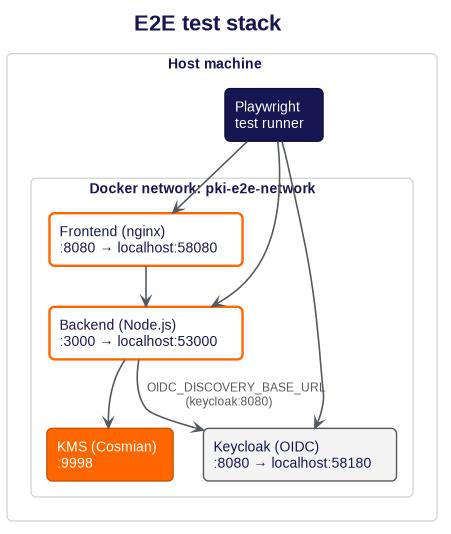
The backend uses OIDC_DISCOVERY_BASE_URL to fetch OIDC configuration from the Docker network (keycloak:8080) while validating tokens against the issuer URL that browsers use (localhost:58180).
Local E2E Testing (Recommended)
Section titled “Local E2E Testing (Recommended)”The docker-compose.e2e.yml provides a complete isolated environment for testing:
# 1. Build images with latest code (if you made changes)docker build --target backend -t ghcr.io/oriolrius/pki-manager-web/backend:latest -f docker/Dockerfile .docker build --target frontend -t ghcr.io/oriolrius/pki-manager-web/frontend:latest -f docker/Dockerfile .
# 2. Start the E2E environment (includes Keycloak with pre-configured test users)docker compose -f docker/docker-compose.e2e.yml up -d
# 3. Wait for all services to be healthy (~60-90 seconds for Keycloak)docker compose -f docker/docker-compose.e2e.yml ps
# 4. Run the RBAC testspnpm playwright test tests/e2e-rbac.spec.ts --reporter=list
# 5. Cleanup when donedocker compose -f docker/docker-compose.e2e.yml down -v
E2E Test Users
Section titled “E2E Test Users”The E2E environment includes pre-configured test users in Keycloak:
| Username | Password | Role | Description |
|---|---|---|---|
testadmin |
Test123! |
admin |
Full access - can create, revoke, delete CAs and certificates |
testuser |
Test123! |
user |
Limited access - can view and issue certificates, cannot perform admin operations |
E2E Services
Section titled “E2E Services”| Service | URL | Description |
|---|---|---|
| Frontend | http://localhost:58080 | PKI Manager UI |
| Backend API | http://localhost:53000 | tRPC API |
| Keycloak | http://localhost:58180 | Identity Provider (admin/admin for Keycloak console) |
| KMS | Internal only | Cosmian Key Management System |
Tests against a deployed instance
Section titled “Tests against a deployed instance”E2E_TARGET=production runs the same tests against a deployed instance. It has no default URL:
set the frontend URL, the Keycloak URL and, when they are not the defaults, the users.
E2E_TARGET=production \E2E_FRONTEND_URL=https://pki.example.com \E2E_KEYCLOAK_URL=https://iam.example.com \E2E_ADMIN_USER=testadmin \E2E_ADMIN_PASSWORD=Test123! \pnpm playwright test tests/e2e-rbac.spec.ts --reporter=listE2E Environment Variables
Section titled “E2E Environment Variables”| Variable | Default | Description |
|---|---|---|
E2E_TARGET |
local |
Target environment: local or production |
E2E_FRONTEND_URL |
(from target) | Frontend URL. Required for production |
E2E_KEYCLOAK_URL |
(none) | Keycloak URL. Required for production |
E2E_ADMIN_USER |
testadmin |
Admin test user |
E2E_ADMIN_PASSWORD |
Test123! |
Admin password |
E2E_TEST_USER |
testuser |
Regular test user |
E2E_TEST_PASSWORD |
Test123! |
Regular user password |
E2E Keycloak Realm
Section titled “E2E Keycloak Realm”The pki-e2e realm is automatically imported when starting the E2E Docker environment:
- Realm:
pki-e2e - Client:
pki-web(public client with PKCE) - Roles:
admin,user - Direct Access Grants: Enabled (for automated testing)
- Brute Force Protection: Disabled (to prevent test lockouts)
E2E Keycloak Access
Section titled “E2E Keycloak Access”| Service | URL | Credentials |
|---|---|---|
| Keycloak Console | http://localhost:58180 | admin / admin |
| OIDC Discovery | http://localhost:58180/realms/pki-e2e/.well-known/openid-configuration | - |
Versions in the end-to-end stack
Section titled “Versions in the end-to-end stack”docker/docker-compose.e2e.yml pins its own images: Keycloak 26.0.5 and Cosmian KMS 5.12.0.
The production Compose file and the dev stack use KMS 5.28.0.
Test users on a deployed instance
Section titled “Test users on a deployed instance”Create the two users in the Keycloak of that instance:
-
Create
testadminuser:- Username:
testadmin - Password:
Test123!(or stronger) - Realm roles:
admin
- Username:
-
Create
testuseruser:- Username:
testuser - Password:
Test123!(or stronger) - Realm roles:
user(noadminrole)
- Username:
When an end-to-end test fails
Section titled “When an end-to-end test fails”Problem: “no such table: audit_log” error
Solution: Database migrations didn’t run. The E2E docker compose automatically runs migrations on startup. If using a custom setup:
docker exec pki-e2e-backend node /app/backend/dist/db/migrate.jsProblem: OIDC token validation fails in Docker
Solution: Ensure OIDC_DISCOVERY_BASE_URL is set for Docker networking:
environment: - OIDC_ISSUER=http://localhost:58180/realms/pki-e2e - OIDC_DISCOVERY_BASE_URL=http://keycloak:8080/realms/pki-e2eProblem: Keycloak healthcheck fails (timeout)
Solution: Keycloak 26+ takes ~60-90 seconds to start. The healthcheck has a 90-second start period. Check logs:
docker logs pki-e2e-keycloakProblem: Tests fail with “Login button not found”
Solution: Wait for all services to be healthy before running tests:
docker compose -f docker/docker-compose.e2e.yml ps# All services should show "healthy" statusOther Playwright specs
Section titled “Other Playwright specs”tests/ also has auth.spec.ts, auth-m2m.spec.ts and e2e-production.spec.ts (OIDC login on a deployed instance; it runs only when PROD_FRONTEND_URL and PROD_KEYCLOAK_URL are set). The base URL of
playwright.config.ts is http://localhost:52082; set PLAYWRIGHT_BASE_URL for another address
(the dev stack serves the web UI on http://localhost:52080).
Examples of the documentation
Section titled “Examples of the documentation”Every runnable example of Call the REST API runs in CI against the demo stack, and the screenshots of the guides come from the same stack. See How the docs are organised.
PKI Manager is a personal project of Oriol Rius, built for his own use. It is not a commercial product. About this project